Free UK Staff Rota Template (Excel) | Zelt
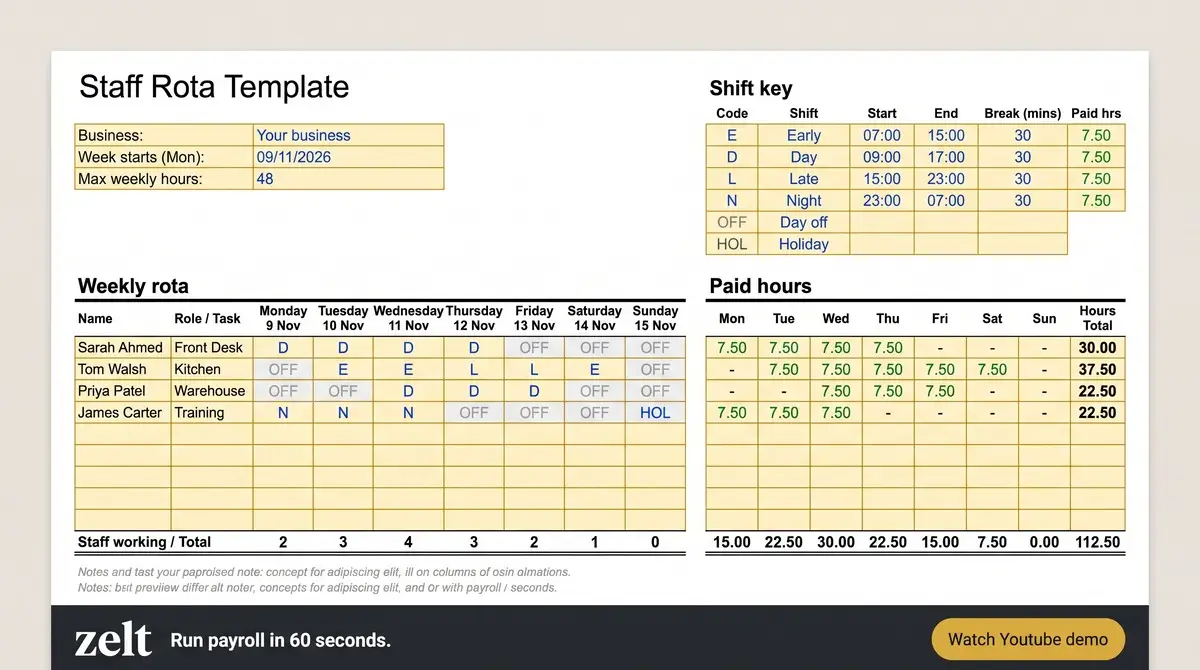
If you are managing the rota of multiple employees with different shifts and working hours, you know how complex it can be. You have to check multiple times who is available or on leave, or you have to adjust employees according to the shifts. The schedule can turn chaotic without proper organisation – it creates issues like double bookings, staff shortages, and unnecessary overtime.
That’s why you can use our rota template to make scheduling much easier. Our free staff schedule template gives you a clear structure to organise employee schedules in advance. You can reuse and update the template every week or month. It makes it easier to keep everyone organised and ensure you have the right people available at the right time.
Download Free Weekly Rota Template
Enter your details below to receive the template via email. Want to suggest improvements or spot something missing? We’d love to hear from you on info@zelt.app
What Is a Staff Rota Template?
A staff rota template is a ready-made schedule that companies retain and reuse. It includes the information like when an employee works and for how long. It’s the starting point for making a rota for your employees – so you don’t need to build a rota every week from scratch.
How to Use Our Rota Template
Using the template is really easy, even if you are not good with spreadsheets. Just follow these five steps.
1. Add employees
Start by writing the names of all your staff in the first column. If you have a big team, it helps to group them by role, like kitchen staff, front of house or nurses. This way you can quickly see if each area is covered.
2. Add dates
Next, put the dates at the top of each column. Don’t just write “Monday”, write the full date as well, like Monday 12 October. It sounds small but it stops a lot of confusion, especially when you are planning a few weeks ahead.
3. Add shifts
Now fill in the shift for each person on each day. You can write the start and end time or use simple labels like Early, Late or Night. Mark days off clearly too, so nobody turns up on the wrong day.
4. Add working hours
Add up the hours for each employee and put it in the total column. Keep in mind breaks, as most people don’t get paid for their unpaid breaks. In the UK, workers aged 18 or over usually have the right to a 20 minute break if they work more than 6 hours, and an average of 48 hours a week is the normal limit unless they have opted out. So checking the hours here helps you stay on the right side of the rules.
5. Check staff coverage
The last step is to look at the rota day by day and ask one question. Do I have enough people at the busy times? If Saturday lunch is your busiest time but only two people are on, you will know before it becomes a problem. Fix any gaps, then share the rota with your team as early as you can, so they have time to plan their own life too.
Types of Schedules You Can Create
One template doesn’t mean one type of rota. You can change it a little and use it for lots of different schedules. Here are the most common ones.
Shift Schedule
A shift schedule splits the day into set blocks, like early, late and night shifts. It is best for businesses that are open for long hours and need different people at different times. With our template, you just write the shift name or time in each box and you’re done.
Daily Rota
A daily rota shows who is working on one single day, often broken down by the hour. It’s really useful for busy places like restaurants, where you might need more staff at lunch and dinner but less in the afternoon. Managers can see the whole day at a glance.
Weekly Rota
This is the most popular one and it is what our template is built for. You plan seven days at a time, so staff know their shifts for the whole week. Most teams I have worked with find weekly rotas the easiest to manage and the easiest to change when something comes up.
Monthly Rota
A monthly rota gives you the bigger picture. It’s good for planning around holidays, bank holidays and busy seasons like Christmas. You can copy the weekly sheet four or five times, or just stretch the dates across the month.
Night Shift Rota
Night shifts need a bit more care. You have to think about rest time between shifts and make sure no one is doing too many nights in a row. A separate night shift rota makes it much easier to keep an eye on this. In the UK, night workers shouldn’t work more than an average of 8 hours in every 24 hours, so tracking hours here is really important.
On-Call Rota
An on-call rota shows who is available to be called in if something goes wrong or someone is off sick. It is common in healthcare, IT support and facilities teams. You can add an extra row or column in the template just for on-call staff so everyone knows who to contact.
Part-Time Staff Rota
Part-time staff often have fixed days or limited hours they can work, for example students or parents doing school runs. Keeping them on a clear rota helps you respect their availability and still fill the gaps. The total hours column is very handy here so you don’t go over their contracted hours.
Which Industries Can Use Our Staff Rota Template?
Pretty much any business with staff working different hours can use it. But some industries really depend on a good rota to run smoothly.
Hospitality and Restaurants
In hospitality, the busy times change every day. Friday nights, Sunday lunch, a big booking or a sunny weekend can all mean you need more hands. A staff schedule template helps managers plan chefs, waiters, bar staff and kitchen porters so the service doesn’t fall apart when it gets busy. It also makes it easier to share tips and hours fairly.
Healthcare and Hospitals
Hospitals, GP surgeries and care homes run 24 hours a day, so there can never be a gap in cover. Staff work long shifts, nights and weekends, and patient safety depends on having the right people in the right place. A clear rota helps you balance day and night shifts, track rest time and plan on-call cover without last minute panic.
Retail
Shops get busier at weekends, during sales and in the run up to Christmas. With a schedule template, retail managers can add extra staff when footfall goes up and cut back when it’s quiet. It also helps when you have a lot of part-time staff and students who can only work certain days.
Offices and Professional Services
You might think offices don’t need a rota, but a lot of them do. Think about reception cover, customer support desks, hybrid working days or who is in the office on which day. A simple rota means the phones always get answered and everyone knows who is working from home and who is in.
Manufacturing and Factories
Manufacturing businesses often run multiple shifts to keep production moving throughout the day. Managing employees across morning, evening and night shifts can become complicated, especially when workers have different working hours and days off. A shift schedule template helps managers plan shift patterns, assign workers to different shifts and make sure each production team has enough staff. But manufacturers may have more complex shift patterns, which is why many use dedicated HR software for manufacturers to manage rotas.
Benefits of Using a Rota Template
An employee schedule template might look like a small thing but it makes a big difference to how your team works. Here are the main benefits.
- Saves time: You don’t have to build a new schedule every week. Just copy last week’s sheet, change a few things and it’s ready.
- Fewer mistakes: When everything is in one clear layout, it’s much harder to double book someone or forget to cover a shift.
- Better staff coverage: You can easily spot the gaps and busy times, so you always have enough people on.
- Fair for everyone: Staff can see how shifts are shared out, which stops arguments about who always gets the weekends or the late shifts.
- Easier to track hours: The total hours column helps with payroll and makes sure nobody is working too much.
- Happier team: When people know their shifts early, they can plan their life around work. This really helps with staff morale and keeping good people for longer.
- It’s free: You don’t need to pay for anything to get started.
That said, a spreadsheet does have its limits. When your team grows past 20 or 30 people, or you have staff across more than one site, keeping a template up to date can get hard. At that point, it’s worth looking at HR or rota softwaree that does the scheduling, holiday tracking and hours for you in one place.
Final Thoughts
Managing staff schedules becomes complicated as your team grows. Different shifts, days off and working hours all need tracking. A work schedule template gives you a simple structure to plan ahead. It spots gaps early and keeps hours under control. You can reuse it every week, adapt it for daily, monthly or night shift rotas, and share it with your team in minutes.
So whether you run a restaurant, care home, shop, office or factory, our free rota template is an easy place to start. Download it, add your staff and shifts, and you’ll have your first rota ready today. And if your team grows past 20 or 30 people or works across more than one site, it may be time to move to HR software that handles scheduling, holidays and hours in one place.
See more>