UK Tax Year Dates & Deadlines 2026/27: HR Guide
 If you manage payroll or HR in the UK, you can easily get confused because the tax year does not follow the standard January to December format. Even without realising, you can miss important payroll actions and HMRC submissions. And then you have to face compliance issues, penalties and unnecessary admin stress.
Keeping track of key tax deadlines helps employers stay compliant and avoid last-minute problems. This guide covers the most important UK tax year dates & deadlines for 2026/27 in one place.
What Date Does the UK Tax Year Start and End?
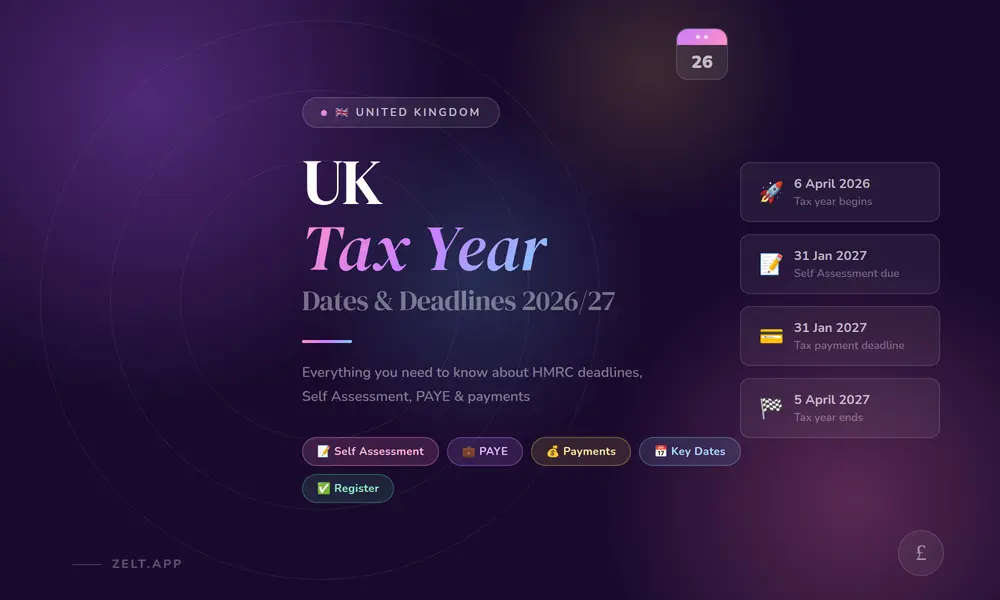
The UK tax year runs from 6 April to 5 April the following year. So the current tax year (2026/27) started on 6 April 2026 and ends on 5 April 2027.
Many employers get confused because they expect the tax year to follow the calendar year (January to December) or the financial year (April to March). This is not correct.
This matters most for employers because almost everything in payroll such as your PAYE submissions, your P60s and your year-end reporting is tied to these dates.
Why Doesn’t the Tax Year Start on 1 January or 1 April?
Honestly, the tax year start date is a bit strange. The reason for this goes back hundreds of years actually. Before 1752 Britain used a calendar, the Julian calendar. In that calendar, the new year started on 25 March, which is also known as Lady Day. When Britain switched to the Gregorian calendar, something odd happened. 11 days were lost in the change. The government did not want to lose tax money so they decided to move the start of the tax year.
This change made up for the days and eventually the tax year started on 6 April.
The 6 April start date dates back to 1752, making it one of the oldest unchanged admin dates in British government history. It’s not something you need to worry about day to day. But it’s a good thing to know if an employee ever asks you why their payslip looks different in April.
Why Keeping Track of Tax Dates Is Important
I’ll be honest, early in my HR career, I didn’t pay as much attention to tax deadlines as I should have. I assumed payroll would handle it, or that HMRC would send a reminder. Sometimes they do. Often they don’t.
Missing a tax deadline as an employer isn’t just an inconvenience. It can mean:
- Automatic fines from HMRC, even if you’re just a day late
- Interest charges on late payments that add up quickly
- Stressed employees if their P60s are late or their tax codes are wrong
- Extra admin trying to sort out penalties and appeals on top of your normal workload
Staying on top of these dates also helps you plan better. When you know a big payment is coming, like your July Class 1A NICs, you can make sure the cash is there. No nasty surprises.
For small businesses especially, tax deadlines and cash flow are tightly linked. Missing one can cause a knock-on effect that takes months to sort out. In fact, HMRC issued over £1.2 billion in penalties in 2022/23 alone and that’s before you count PAYE penalties on top.
Key Tax Dates and Deadlines for Employers
Here’s a clear overview of the main deadlines you need to plan around as an employer in 2026/27.
PAYE and National Insurance
These are your most regular obligations. Get these in your calendar now.
| Deadline | What it is |
|---|---|
| On or before each payday | Submit Full Payment Submission (FPS) to HMRC |
| 19th of each month | PAYE, NIC and CIS payment due by post |
| 22nd of each month | PAYE, NIC and CIS payment due electronically |
| 6 April 2026 | Update all employee payroll records for the new tax year |
| 19 April 2026 | Final Employer Payment Summary (EPS) for 2025/26 |
| 31 May 2026 | Issue P60s to all employees |
| 6 July 2026 | Submit P11D and P11D(b) forms |
| 19 July 2026 | Pay Class 1A NICs by post |
| 22 July 2026 | Pay Class 1A NICs electronically |
The FPS is the big one. You need to submit it on or before every single payday, not after, not the next day. HMRC is strict about this and late submissions attract penalties.
Note: you don’t need to submit a P11D if all employee expenses are covered under a PAYE Settlement Agreement.
Download our free 2026/27 Employer Tax Deadline Calendar

Want all of these dates in one place? Download our free 2026/27 Employer Tax Deadline Calendar, a print-ready PDF with every key date, monthly PAYE reference table and year-end checklist. Enter your details below to receive the via email. Want to suggest improvements or spot something missing? We’d love to hear from you on info@zelt.app
See how Zelt brings payroll, HR, and people management together in one connected platform.
Tax Payment Deadlines
Outside of your regular monthly PAYE payments, these are the bigger annual payment deadlines to plan for:
- 19 April 2026 — Pay any remaining PAYE/NIC balance for 2025/26
- 19 July 2026 — Class 1A NICs on employee benefits (by post)
- 22 July 2026 — Class 1A NICs on employee benefits (electronic)
If you offer company cars, private medical insurance, or other taxable benefits to staff, the July deadline is particularly important. Miss it and you’ll be paying interest on top.
Self Assessment Dates
| Deadline | What it is |
|---|---|
| 31 January 2027 | Online Self Assessment submission for 2025/26 |
| 31 January 2027 | Tax payment due for 2025/26 |
| 31 January 2027 | First payment on account for 2026/27 |
| 5 April 2027 | End of 2026/27 tax year — last chance to claim overpaid tax from 2021/22 |
| 6 April 2027 | Start of 2027/28 tax year |
| 31 July 2027 | Second payment on account for 2026/27 |
| 5 October 2027 | Deadline to register for Self Assessment for 2026/27 |
| 31 October 2027 | Paper Self Assessment submission for 2026/27 |
| 30 December 2027 | Online submission deadline to pay tax bill through PAYE tax code |
| 31 January 2028 | Online Self Assessment submission for 2026/27 |
Limited Company Dates
| Deadline | What it is |
|---|---|
| 9 months after financial year end | Submit annual accounts to Companies House |
| 9 months and 1 day after financial year end | Pay corporation tax |
| 12 months after financial year end | File CT600 corporation tax return with HMRC |
| 12 months after incorporation or last statement | Submit confirmation statement to Companies House |
| 9 months after financial year end | Submit dormant accounts (if not actively trading) |
LLP Dates
| Deadline | What it is |
|---|---|
| 31 October (paper) / 31 January (online) | File tax return where partners are individuals |
| 9 months (paper) / 12 months (online) after period end | File tax return where all partners are companies |
| Every 12 months from incorporation | Submit confirmation statement |
| 9 months after financial year end | Submit annual accounts to Companies House |
Other Important Dates
A few more dates that often get overlooked:
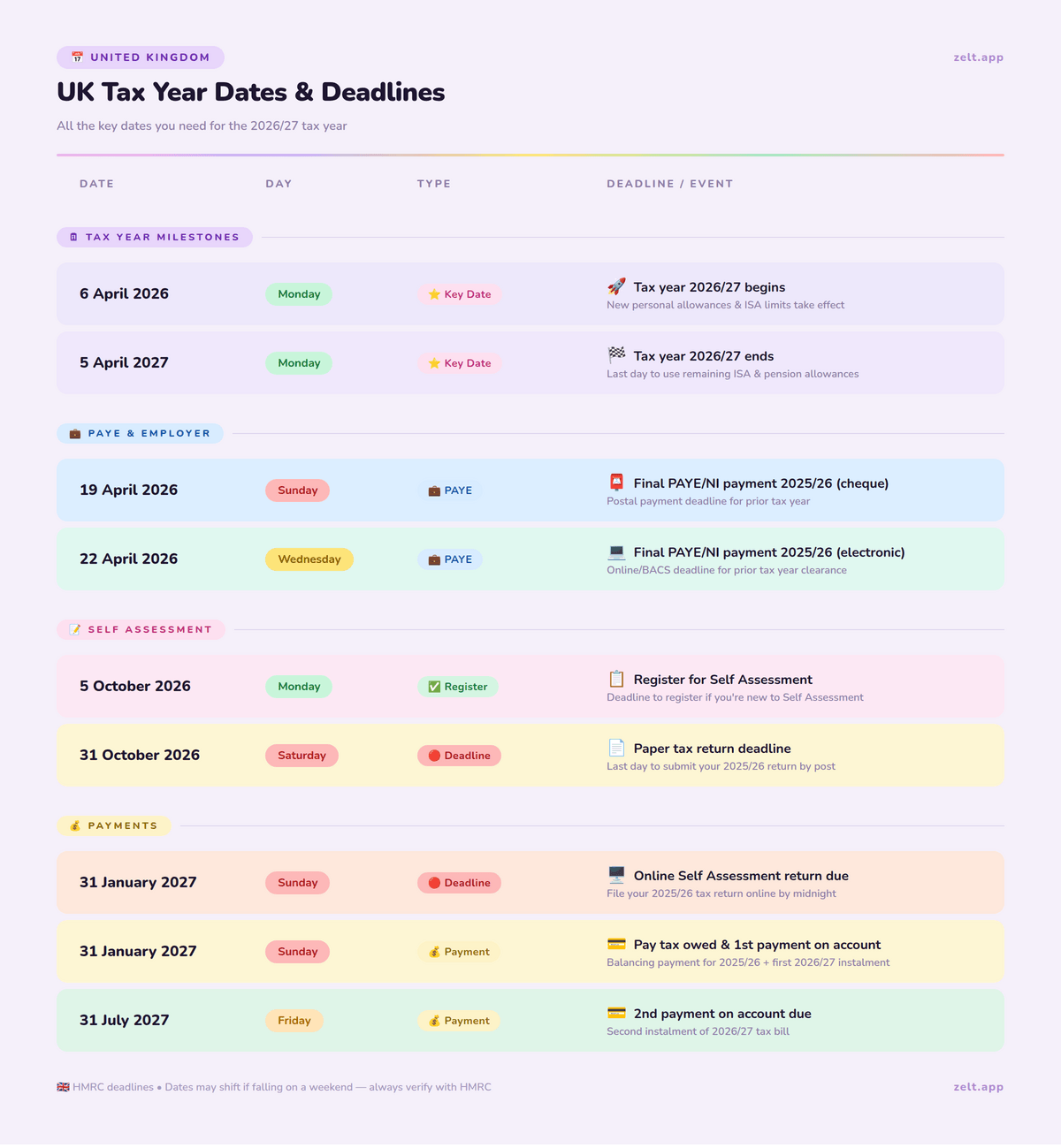
- 5 April 2026 — End of 2025/26 tax year. Last chance to claim overpaid tax from 2020/21
- 6 April 2026 — Start of 2026/27 tax year. New rates, codes and thresholds all reset
- Register for PAYE — New employers must register no sooner than two months before their first payday and no later than four weeks before.
- Employers must also automatically enrol eligible employees into a workplace pension. Missing auto enrolment deadlines carries fines starting at £50 per day.
What Should I Do Before the End of the Tax Year?
The period between January and 5 April is your prep window. Use it well and your year-end will be smooth. Leave it all to the last week and it won’t be.
Here’s what I’d recommend working through before 5 April 2027:
- Check your payroll data is accurate. Go through each employee record. Check their tax codes are correct, their National Insurance numbers are on file, and their pay details are up to date. Errors here cause problems on P60s later.
- Review employee benefits and expenses. Make a list of any benefits you’ve provided — company cars, medical insurance, loans, gym memberships. You’ll need this for your P11D submissions in July. Much easier to do this now than try to remember in six months.
- Make sure all FPS submissions are up to date. If you’ve missed any FPS submissions during the year, sort them now. HMRC will flag gaps and it’s much easier to resolve before year-end than after.
- Check for leavers and new starters. Make sure everyone who left during the year has had their P45 issued and that new starters are correctly set up on your system.
- Check student loan deductions — there are now 4 plans (Plan 1, Plan 2, Plan 4 and Postgraduate Loan), each with different thresholds. Wrong plan means wrong deductions. Full guidance on HMRC’s student loan page.
- Plan for the new tax year. From 6 April, new rates come into effect. That means new tax codes, updated NI thresholds, new minimum wage rates, and updated statutory pay figures. Get your payroll software updated before you run the first payroll of the new year.
The more you do in February and March, the less you’ll be scrambling in April.
What Changes for Employers at the Start of the New Tax Year?
Every 6 April brings a fresh set of changes that affect how you run payroll. It’s not just about flipping the year — there are usually rate changes, threshold updates and sometimes new rules to follow.
Here’s what typically changes at the start of a new tax year:
- National Minimum Wage rates. New minimum wage rates usually kick in on 1 April (just before the tax year). Make sure every employee is paid at least the current National Minimum Wage rates from 1 April.
- Income tax thresholds. The personal allowance and tax band thresholds may change. These affect how much income tax is deducted from your employees’ wages. Your payroll software should update automatically — but always double check.
- National Insurance thresholds and rates. Both employee and employer NI thresholds can change in April. Employer NI in particular has a direct impact on your business costs, so it’s worth knowing the new rates before they come into effect.
- Statutory pay rates. Statutory Sick Pay (SSP), Statutory Maternity Pay (SMP), Statutory Paternity Pay (SPP) and Statutory Adoption Pay all have set weekly rates that are reviewed each April. Update these in your payroll system before processing your first pay run of the new year. Small employers can reclaim 100% of Statutory Maternity, Paternity and Sick Pay — plus an extra 3% — through the Small Employers Relief scheme.
- Student loan thresholds. The income thresholds for Plan 1, Plan 2 and Plan 4 student loan deductions are usually updated each April too.
- New tax codes. HMRC will issue new tax codes for employees where something has changed — a new benefit, an underpayment from the previous year, or a change in personal circumstances. You’ll get a P9 notice telling you which codes to update. Currently, the standard code is tax code 1257L.
My advice: don’t just assume your payroll software has picked everything up. Spend 30 minutes at the start of each new tax year going through the key rates manually. It takes less time than fixing a payroll error three months later.
What Is the Significance of Income Tax Weeks in the UK?
If you run weekly payroll — or even if you don’t — you’ll come across the term “tax week” when dealing with HMRC or payroll software. It’s one of those things that confuses a lot of people the first time they see it.
Here’s how it works. The UK tax year starts on 6 April. HMRC divides this into 52 tax weeks (sometimes 53 in certain years). Tax week 1 always starts on 6 April and runs to 12 April. Tax week 2 runs from 13 April to 19 April. And so on throughout the year.
So when your payroll software refers to “week 32” or HMRC asks about a submission for “tax week 45,” they’re counting from 6 April — not from January.
Why Does This Matter for Employers?
If you pay employees weekly, your FPS submissions and PAYE payments are tied to these tax week numbers. Getting the wrong week number on a submission can cause mismatches in HMRC’s system, which then flags as an error and needs to be corrected.
It also matters for things like National Insurance calculations, particularly when an employee’s pay varies week to week. NI is calculated on a per-period basis, so the tax week number needs to be accurate.
Most modern payroll software handles this automatically. But if you’re ever doing any manual calculations or checking HMRC correspondence, knowing what tax week you’re in saves a lot of confusion.
What Is the Significance of a Tax Month in the UK Tax System?
Similar to tax weeks, HMRC also uses tax months — and again, they don’t line up with calendar months.
A tax month always runs from the 6th of one month to the 5th of the next. So tax month 1 runs from 6 April to 5 May. Tax month 2 runs from 6 May to 5 June. And so on until tax month 12, which runs from 6 March to 5 April.
Why This Matters for Employers
Your monthly PAYE payment deadlines are based on tax months, not calendar months. The payment for tax month 1 (6 April to 5 May) is due by 19 or 22 May. The payment for tax month 2 is due by 19 or 22 June.
This is where employers sometimes get tripped up. If you pay your employees on the 28th of each month, that payment falls in one tax month. But the PAYE payment to HMRC for that tax month isn’t due until the 19th or 22nd of the following calendar month.
It sounds more complicated than it is. Once you’ve run payroll a few times, the pattern becomes second nature. But in those early months, it’s worth mapping it out clearly so nothing slips through.
What Happens If You Miss a Tax Deadline?
Missing a tax deadline as an employer isn’t just a slap on the wrist. HMRC has a pretty clear penalty structure and they do enforce it.
Late FPS Submissions
HMRC charges a monthly penalty for late FPS submissions. The amount depends on how many employees you have:
- 1–9 employees: £100 per month
- 10–49 employees: £200 per month
- 50–249 employees: £300 per month
- 250+ employees: £400 per month
You get one late FPS per tax year without penalty. After that, the charges kick in automatically. HMRC’s late filing and payment penalties apply automatically after the first missed submission.
Late PAYE Payments
If you’re late paying your PAYE, NIC or CIS to HMRC, you’ll be charged a percentage of the amount owed:
- 1–3 days late: no penalty (but don’t make a habit of it)
- 4–6 days late: 1% of the amount due
- 7–9 days late: 2%
- 10–12 days late: 3%
- 13+ days late: 4% and potentially further surcharges
On top of penalties, HMRC currently charges 8.5% interest on late PAYE payments.
Late P60 or P11D
If you don’t issue P60s by 31 May or submit P11Ds by 6 July, HMRC can fine you £300 per form, plus £60 per day if it continues. These penalties add up fast. A small business with 10 employees missing the P11D deadline by a month could easily be looking at a four-figure fine.
How Can I Avoid Penalties from HMRC?
To avoid penalties from HMRC, it’s important to stay organised and use UK payroll software that automates submissions, tracks deadlines and reduces manual errors.
Beyond that, here’s what actually works in practice:
- Set calendar reminders a week before every deadline, not on the deadline itself
- Reconcile your payroll at the end of every tax month, not just at year-end
- Keep your employee records up to date throughout the year — don’t leave corrections to April
- If something goes wrong, contact HMRC early. They’re more understanding when you reach out proactively than when they come to you
What Should I Do If I Can’t Pay on Time?
If you genuinely can’t make a PAYE payment on time, the worst thing you can do is ignore it.
Contact HMRC as soon as you know there’s a problem. You may be able to set up a Time to Pay arrangement online with HMRC if you owe £100,000 or less and don’t have existing debts with HMRC. This lets you spread the payment over a period you can manage.
To set up a payment plan online you’ll need to:
- Have filed all outstanding payroll submissions
- Owe £100,000 or less
- Not have any existing payment plans or debts with HMRC
- Plan to clear the debt within 12 months
If you don’t meet those criteria, call HMRC directly on 0300 200 3200 and explain your situation. They’d rather agree a payment plan than chase a debt for months. Repeatedly missing the 22nd monthly deadline — even by a day — can trigger an HMRC compliance check on your business.
How to Stay on Top of All Tax Year Deadlines
I’ve seen employers with great businesses get caught out by tax deadlines simply because there was no system in place. It’s not about being disorganised — it’s about having too much to do and not enough time to track everything manually.
Here’s what I’d recommend:
Build an Employer Tax Calendar
At the start of every tax year, sit down and map out every deadline for the next 12 months. Put them in a shared calendar that your payroll and finance team can both see. Include:
- Monthly PAYE payment dates (19th/22nd of every month)
- FPS submission reminders before each payday
- P60 deadline (31 May)
- P11D deadline (6 July)
- Class 1A NIC deadlines (19/22 July)
- Year-end prep window (February to March)
Set reminders 5–7 days before each one. Not on the day — before it.
Automate Payroll Submissions
If you’re still submitting FPS manually each month, you’re creating unnecessary risk. Most modern payroll software will submit your FPS to HMRC automatically on payday. Set it up once, check it’s working, and let it run.
Same goes for PAYE payments. You can set up a direct debit with HMRC for your monthly PAYE so the payment goes out automatically on the 22nd. One less thing to remember.
Use HR Software to Manage Year-End Tasks
Year-end is where things get complicated — P60s, P11Ds, new tax codes, rate changes. Doing all of this manually across spreadsheets is how errors happen.
Good all-in-one HR software like Zelt handles this automatically. It pulls together your payroll data, generates P60s for each employee, flags any missing information before deadlines, and updates rates when HMRC publishes new figures. It’s not just about saving time — it’s about reducing the risk of a costly mistake.
What Is Making Tax Digital?
Making Tax Digital (MTD) is a government programme to move the UK tax system online. The idea is to replace paper records and manual submissions with digital record-keeping and software-based reporting.
For employers, most of the MTD changes around PAYE have already happened — RTI (Real Time Information) payroll submissions have been in place since 2013.
But MTD is expanding. Here’s what’s coming:
- MTD for VAT — already in effect for all VAT-registered businesses. You must use MTD-compatible software to submit VAT returns.
- MTD for Income Tax (ITSA) — from April 2026, self-employed people and landlords earning over £50,000 must keep digital records and submit quarterly updates to HMRC instead of an annual tax return. This extends to those earning over £30,000 from April 2027. Self-employed people earning over £50,000 must now comply with Making Tax Digital for Income Tax .
- MTD for Corporation Tax — still in planning. Not expected before 2026 at the earliest.
For most employers, MTD’s biggest practical impact right now is making sure your payroll and accounting software is HMRC-recognised and submitting data in the right format. If you’re using outdated or non-compliant software, now is the time to review it.
Frequently Asked Questions
What date does the UK tax year start and end?
The UK tax year starts on 6 April and ends on 5 April the following year. The current tax year is 2026/27, running from 6 April 2026 to 5 April 2027.
When does the new tax year start in 2027?
The new tax year (2027/28) starts on 6 April 2027. This is when new tax codes, updated NI rates, new minimum wage rates and revised statutory pay figures all come into effect.
What are tax weeks and tax months in the UK?
Tax weeks and tax months are HMRC's way of dividing the tax year for payroll purposes. A tax month runs from the 6th of one month to the 5th of the next. Tax week 1 starts on 6 April. They don't follow calendar months or weeks — they always count from 6 April.
What are the key deadlines to remember for tax returns?
For employers, the most important annual deadlines are: 19 April (final EPS), 31 May (P60s to employees), 6 July (P11D submission), and 19/22 July (Class 1A NICs). Monthly PAYE payments are due by the 19th (post) or 22nd (electronic) of each month.
How can I avoid penalties from HMRC?
Submit your FPS on or before every payday, pay PAYE by the 22nd of each month, issue P60s by 31 May, and submit P11Ds by 6 July. Set calendar reminders a week before each deadline and use payroll software that automates submissions where possible.
What is the current tax year?
The current tax year is 2026/27, which runs from 6 April 2026 to 5 April 2027.