Best Leave Management Software UK (2026): 12 Top Tools
Managing employee leave should not mean chasing emails, updating spreadsheets and checking paper forms. For UK employers and HR teams, these manual tasks can lead to errors, missed requests and confusion over holiday balances. The best leave management software brings everything together in one place, making it easier to manage holiday requests, approvals and absence records.
In this guide, we have compiled a list of the best leave management systems for UK businesses in 2026. We compare features, pros, cons, and pricing. We also explain the UK leave rules your software needs to handle so you can pick the right fit.
Our Top Picks at a Glance
Here is a quick summary of the 10 best leave management software for UK small-to-medium businesses in 2026. Use it to shortlist two or three options, then read the full reviews below.
| Software | Best for | Business size | Pricing model |
|---|---|---|---|
| Zelt HR | Leave management with HR and payroll | Small to mid-sized (10+ staff) | Starts from £5 |
| Timetastic | Standalone leave tracking | Any size | Starts from £1.5 |
| Breathe HR | UK small businesses | Small (5–250 staff) | Starts from £5 |
| CharlieHR | First HR system for small teams | Small (under 50 staff) | Starts from £21 |
| BambooHR | Mid-sized firms with HR teams | Mid-sized | Starts from £8 |
| Personio | Growing UK and European SMEs | Small to large (10–2,000 staff) | Starts from £8 |
| Leave Dates | Simple holiday booking | Small to mid-sized | Starts from £1 |
| edays | Absence and sickness tracking | Small to large | Starts from £2 |
| The Access Group | Larger UK organisations | Large | Starts from £3 |
| IRIS | Leave linked to UK payroll | All sizes | Starts from £10 |
What Is Leave Management Software?
Leave management software is an online tool that helps you track and manage staff time off. Staff use it to book holidays, managers use it to approve requests, and the system keeps everyone’s balance up to date automatically.
It usually covers more than holidays. Most tools also track sickness, family leave, training days and other absences, so all your leave records sit in one place instead of spread across emails and spreadsheets.
How We Chose These Tools
We looked at each tool from the point of view of a UK business owner, office manager or HR lead. A good leave tool should make booking time off easy and keep balances correct without extra work.
We compared every option using the same points:
- UK leave rules: support for statutory holiday, bank holidays, part-time staff and irregular hours workers.
- Absence tracking: sickness records, return-to-work notes and absence reports.
- Ease of use: how quickly staff can book leave and managers can approve it, including on mobile.
- Payroll and calendar links: connections to UK payroll, Google Calendar, Outlook, Slack and Microsoft Teams.
- Data protection: UK GDPR support and clear details on where data is stored.
- Value for money: clear pricing and features that match the cost.
Some tools on this list only track leave. Others are full HR platforms with leave built in. We explain the difference so you can choose what fits your business.
10 Best Leave Management Software For UK Businesses
Below are our full reviews of the 10 best leave management software tools for UK Small to mid-sized businesses. Each one follows the same layout so you can compare tools side by side.
1.Zelt HR: Best for Leave Management and HR + Payroll
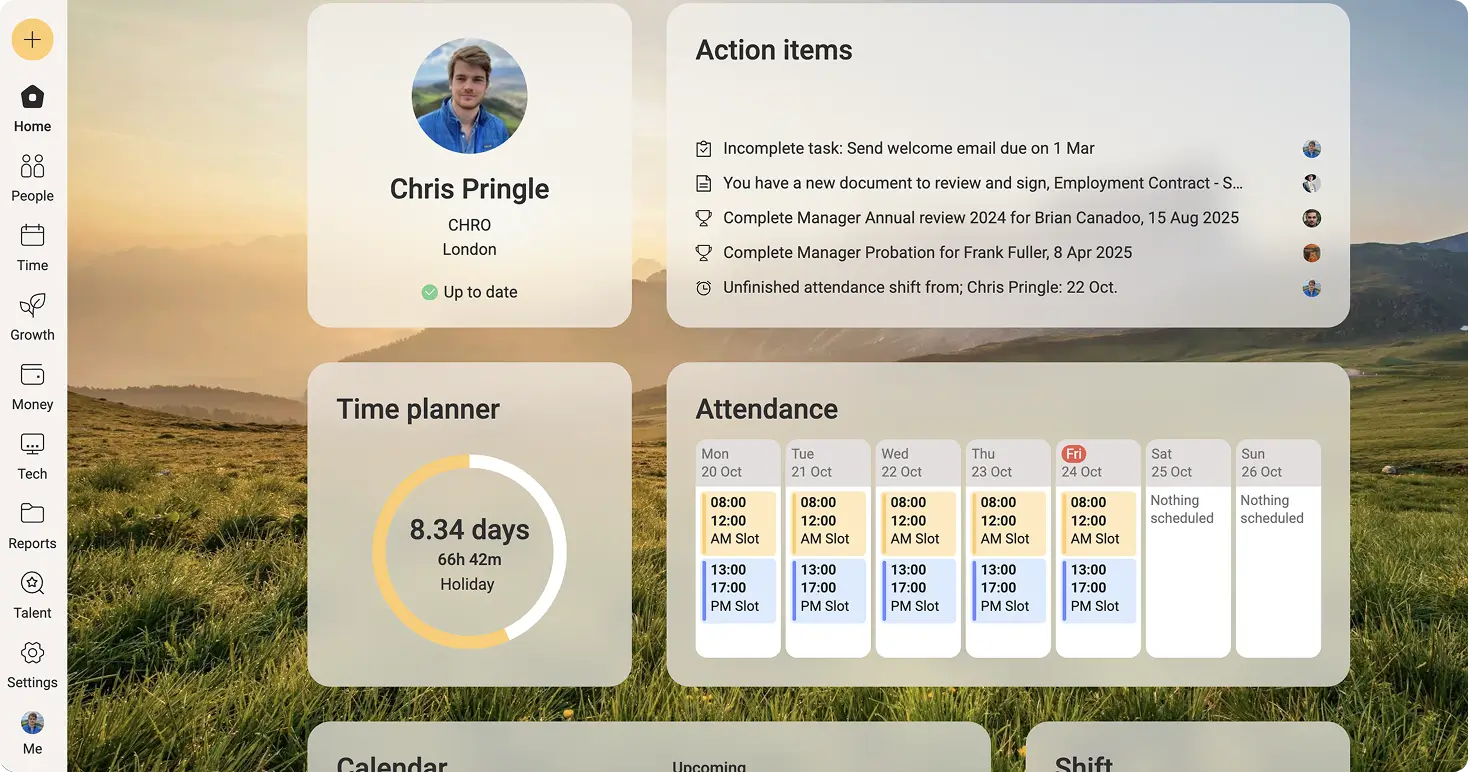
Zelt is an all-in-one HR software that UK small- to mid-sized businesses use to streamline leave management along with core hr operations and payroll. Leave management sits in the same place as your staff records and payroll, so approved time off flows straight into pay with no retyping.
Who It’s Best For
Zelt suits UK small and mid-sized businesses that want leave, HR, performance management, onboarding, IT and payroll in one tool. It is a strong fit if you are tired of copying absence data from one system into another before every pay run, or if you manage part-time, shift or multi-site teams with different leave rules.
Key Features
- Custom leave policies for holiday, sickness, unpaid leave, family leave and time off in lieu
- Automatic holiday balances, pro-rated for new starters and part-time staff
- Allowances in days or hours, adjusted automatically when someone’s working pattern changes
- Carry over rules with limits and expiry dates, plus extra leave for length of service
- Leave requests and approvals on web and mobile, with single or multi-level approvals
- Team calendar showing who is off, with the option to block bookings on key dates
- UK bank holidays added automatically, plus public holidays in 198+ countries
- Statutory Sick Pay and Statutory Maternity Pay calculated automatically in payroll
- Absence reports by person, team or leave type
Pros
- Leave, HR and UK payroll in one place, so there’s no double entry and fewer pay errors
- Built for UK businesses, with statutory pay, bank holidays and part-time pro rata handled out of the box
- Flexible rules for different teams, sites or contracts, assigned automatically
- Modular, so you only pay for what you need
Cons
- More than you need if you only want a simple holiday planner
- Some advanced sickness tools, such as Bradford Factor scoring, aren’t built in
Pricing
Pricing starts at £5/user/month. Zelt’s pricing depends on company size and selected products as it is a modular platform.
Integrations
Zelt syncs approved leave to Google Calendar and Outlook and sends absence notifications to Slack. It also connects with Google Workspace, Microsoft 365, Xero and QuickBooks, plus 100+ HR and finance apps through Merge.dev.
See Zelt in Action
Discover how Zelt simplifies leave requests, holiday tracking and approvals, so your HR team spends less time on admin.
2.Timetastic: Best Standalone Leave Tracker
Timetastic is a UK-made app that does one job well: tracking staff holidays and absence. It is simple, friendly and quick to set up.
Who It’s Best For
Timetastic suits businesses of any size that want a dedicated holiday tracker without buying a full HR system. It works well alongside your existing payroll.
Key Features
- Simple leave booking and one-click approvals
- Wallchart showing everyone’s time off
- Bank holidays for the UK and many other countries
- Limits on how many people can be off at once
- Lockout dates for busy periods
- Absence reports and sickness tracking
Pros
- Very easy for staff and managers to use
- Fast setup, often in under an hour
- Strong calendar and chat app links
Cons
- No payroll or wider HR features
- You need a separate system for contracts, reviews and staff records
Pricing
Pricing starts at £1.5/user/month. Timetastic charges a low monthly fee per user and offers a free trial.
Integrations
Timetastic syncs with Google Calendar and Outlook, and connects with Slack and Microsoft Teams.
3.Breathe HR: Best UK HR Software for Small Businesses
Breathe is a UK HR system designed for small businesses. It covers holiday and absence alongside staff records, documents and performance.
Who It’s Best For
Breathe suits UK small businesses, roughly from 5 to 250 staff, that want simple HR software with good leave tools.
Key Features
- Holiday booking with automatic balances
- Sickness tracking with Bradford Factor scores
- Company holiday calendar
- Employee records and document storage
- Performance reviews and objectives
- Mobile app for staff
The Bradford Factor scores frequent short absences more heavily than one long absence. This helps you spot patterns early and plan a supportive conversation.
Pros
- Built for UK small businesses
- Easy to set up and use
- Good balance of leave and wider HR features
Cons
- No built-in payroll
- May feel limited for larger or more complex organisations
Pricing
Pricing starts at £5/user/month. Breathe uses monthly plans based on your number of employees, with a free trial.
Integrations
Breathe connects with calendar tools and a range of UK payroll and accounting software.
4.CharlieHR: Best First HR Software for Small UK Teams
CharlieHR is a London-based HR tool made for small teams that are buying HR software for the first time. It keeps things simple and friendly.
Who It’s Best For
CharlieHR suits small UK startups and teams that need leave tracking plus basic HR. It is ideal if you do not have a dedicated HR person.
Key Features
- Time off booking and approvals
- Team calendar and absence tracking
- Onboarding and offboarding checklists
- Employee records and documents
- Performance reviews and one-to-ones
Pros
- Very easy for non-HR people to run
- Clean, modern design
- Covers the HR basics a small team needs
Cons
- No built-in payroll
- Less suited to large or complex organisations
Pricing
Pricing starts at £21/user/month. CharlieHR charges per employee each month, with different plans and a free trial.
Integrations
CharlieHR connects with Slack, Google Calendar, Outlook and several payroll tools.
5.BambooHR: Best for Mid-Sized Businesses With HR Teams
BambooHR is a popular US-built HR system. Its time off tools are flexible and work well for businesses with an HR team to set up detailed leave policies.
Who It’s Best For
BambooHR suits mid-sized businesses with an HR team that wants leave tracking inside a wider HR system. It works best if you already have a UK payroll provider you plan to keep.
Key Features
- Custom time off policies and accrual rules
- Leave requests and approvals on web and mobile
- Who’s Out calendar
- Employee records and self-service
- Reports on time off and absence
Pros
- Flexible leave policy settings
- Easy for staff to use
- Large marketplace of integrations
Cons
- BambooHR payroll is US only, so UK firms need separate payroll
- Some settings feel designed for US businesses first
- No public pricing
Pricing
Pricing starts at £8/user/month. BambooHR offers tiered plans priced by custom quote.
Integrations
BambooHR connects with Slack, Microsoft Teams, calendar tools and payroll providers, including some that support UK payroll.
6.Personio: Best for Growing UK and European SMEs
Personio is an all-in-one HR platform from Germany. Its absence tools handle complex leave rules and work well for teams in more than one country.
Who It’s Best For
Personio suits growing businesses with around 10 to 2,000 staff, especially those with teams in the UK and Europe.
Key Features
- Custom absence types and accrual rules
- Approval workflows with substitutes and multiple approvers
- Public holiday calendars by location
- Attendance and time tracking
- Absence reports and HR analytics
- Recruitment, onboarding and performance tools
Pros
- Handles different leave rules across countries
- Strong automation for HR tasks
- Scales well as you grow
Cons
- UK payroll usually runs through an integration
- More than you need if you only want a holiday tracker
- No public pricing
Pricing
Pricing starts at £8/user/month. Personio offers tiered plans with custom quotes based on company size.
Integrations
Personio connects with Google Calendar, Outlook, Slack, Microsoft Teams and many payroll providers.
7.Leave Dates: Best for Simple Holiday Booking
Leave Dates is a straightforward online holiday planner. It focuses on making leave booking quick and clear for everyone.
Who It’s Best For
Leave Dates suits small and mid-sized teams that want a simple, low-cost way to replace a holiday spreadsheet.
Key Features
- Simple leave requests and approvals
- Shared holiday calendar
- Automatic allowance tracking
- UK bank holidays and custom leave types
- Absence and sickness records
Pros
- Very simple to set up and use
- Good value for small teams
- Clean calendar view
Cons
- No payroll or wider HR features
- Fewer advanced reports than larger systems
Pricing
Pricing starts at £1/user/month. Leave Dates charges a monthly fee per user and offers a free trial.
Integrations
Leave Dates syncs with Google Calendar and Outlook and connects with Slack and Microsoft Teams.
8.edays: Best for Absence and Sickness Tracking
edays is a UK absence management tool. It goes further than holiday booking, with strong tools for sickness tracking and staff wellbeing.
Who It’s Best For
edays suits UK organisations where sickness absence is a real concern, such as care, education or manufacturing.
Key Features
- Holiday booking and allowance tracking
- Sickness recording with return-to-work forms
- Bradford Factor and absence trigger alerts
- Wellbeing tools
- Detailed absence reports
For example, edays can alert a manager when someone reaches a set number of sick days. That gives the manager a prompt to check in and offer support.
Pros
- Strong sickness and absence management
- UK-focused product
- Helpful alerts for managers
Cons
- No built-in payroll
- Less focus on wider HR features such as performance reviews
Pricing
Pricing starts at £2/user/month. edays is priced by quote or per user, depending on your needs.
Integrations
edays connects with calendar tools and a range of HR and payroll systems.
9.The Access Group: Best for Larger UK Organisations
The Access Group is one of the UK’s biggest business software suppliers. Its HR and payroll products include absence management as part of a wider people platform.
Who It’s Best For
Access suits larger UK organisations with complex structures, many sites or several pay groups. It is a good fit if you want one supplier for HR, payroll and other business software.
Key Features
- Holiday and absence management inside Access HR products
- Configurable leave rules for different contracts and sites
- Manager and staff self-service
- Links to Access payroll
- Detailed workforce and absence reporting
Pros
- Handles large, complex organisations
- UK supplier with UK payroll
- Wide range of connected business tools
Cons
- Too complex for small businesses
- Setup can take longer than simpler tools
- No public pricing
Pricing
Pricing starts at £3/user/month. The Access Group prices by custom quote based on headcount and modules.
Integrations
Access connects its HR tools with its own payroll, finance and workforce products, plus third-party systems.
10.IRIS: Best for Leave Linked to UK Payroll
IRIS is a well-known UK supplier of payroll and accounting software. Its HR tools link leave and absence directly to payroll, which reduces errors at pay time.
Who It’s Best For
IRIS suits UK businesses that already use IRIS payroll or want payroll and leave from the same supplier. It also suits accountants and bureaus running payroll for clients.
Key Features
- Holiday and absence tracking linked to IRIS payroll
- Staff self-service for booking leave
- Sickness records to support statutory sick pay
- HR records and documents
- Absence and payroll reports
Pros
- Strong link between leave and UK payroll
- Long-standing UK payroll expertise
- Products for different business sizes
Cons
- Several products can make it hard to know which one you need
- Interface may feel less modern than newer HR tools
- No public pricing for most HR products
Pricing
Pricing starts at £3/user/month. IRIS prices by quote, depending on the product and number of employees.
Integrations
IRIS connects its HR tools with IRIS payroll and accounting software, plus some third-party apps.
Benefits of Leave Management Software
The main benefit is simple. You spend less time chasing leave requests and fixing mistakes. Here is how that helps your business day to day.
Less Admin for Managers and HR
Without software, a holiday request might go through email, a paper form and a spreadsheet. Every step takes time and creates room for error.
With leave software, requests and approvals happen in a few clicks. Managers can approve leave from their phone, and HR no longer needs to update balances by hand.
Accurate Holiday Balances
Working out holiday for part-time staff, new starters and leavers is easy to get wrong. Mistakes can mean staff get too little leave or too much.
Good software calculates balances for you based on each person’s contract and start date. Staff can check their own balance at any time, so fewer people need to ask HR.
A Clear View of Who’s Off and When
A shared calendar shows who is off today, next week or next month. This helps managers avoid leaving a team short-staffed.
For example, if two of your three customer service staff are already off in August, a manager can see that before approving a third request.
Useful Absence Reports
Leave software turns absence data into simple reports. You can see sickness levels by team, spot patterns and track holiday that has not been used.
This helps you act early. If one team has high sickness rates, you can look into workload or wellbeing before the problem grows.
Links With Payroll and Calendars
Many tools send absence data straight to payroll. This matters for unpaid leave, sick pay and holiday pay for leavers.
Calendar links also help. Approved leave can appear in Google Calendar or Outlook, so colleagues know not to book meetings with someone who is away.
Key Features to Look For
Not every business needs every feature. Use this list to check which ones matter most for your team.
| Feature | What it does | Why it matters |
|---|---|---|
| Online requests and approvals | Staff book leave and managers approve it in an app | Cuts out emails and paper forms |
| Automatic balances | Works out holiday based on contract, hours and start date | Fewer mistakes for part-time staff and new starters |
| Team calendar | Shows who is off and when | Helps you keep enough cover |
| Custom leave types | Tracks holiday, sickness, family leave, training and more | Keeps all absence in one record |
| Absence reports | Shows trends by person or team | Helps you spot problems early |
| Mobile app | Lets staff book and managers approve on the go | Vital for frontline and remote staff |
| Payroll and calendar links | Sends absence to payroll and calendars | Saves time and reduces pay errors |
If you employ shift workers, also look for rota links. If you have staff abroad, check that the tool supports public holidays in other countries.
UK Leave Rules Your Software Should Handle
UK leave law has some tricky parts. Your software does not replace legal advice, but it should help you follow the rules without complex calculations.
Statutory Holiday, Bank Holidays and Part-Time Staff
Most UK workers are entitled to 5.6 weeks of paid holiday each year. For someone working five days a week, that is 28 days. Employers can choose whether bank holidays count towards this total.
Part-time staff get the same 5.6 weeks, worked out in proportion to their hours. For example, someone working three days a week gets 16.8 days. Your software should work this out for you and handle bank holidays fairly for part-time staff.
Irregular Hours and Part-Year Workers
For leave years that begin on or after 1 April 2024, employers can calculate holiday entitlement for irregular-hours and part-year workers at 12.07% of the hours they work during each pay period. They can also use rolled-up holiday pay for these workers, paying holiday pay alongside their normal wages.
This is hard to track in a spreadsheet. Check that your software can calculate holiday based on hours worked, not just fixed days.
Sickness, Fit Notes and Statutory Sick Pay
Staff can self-certify for the first seven days of sickness. After that, they usually need a fit note. Rules for statutory sick pay (SSP) changed in April 2026 under the Employment Rights Act, including removing the waiting days before SSP starts. Your software should record sick days accurately and pass them to payroll so SSP is paid correctly.
Family and Other Statutory Leave
UK staff can be entitled to many types of family and statutory leave. These include:
- Maternity, paternity and adoption leave
- Shared parental leave
- Unpaid parental leave
- Parental bereavement leave
- Neonatal care leave
- Carer’s leave
- Time off for dependants in emergencies
Each type has its own rules on length, eligibility and pay. Some rules have changed recently, so always check the latest details on. Good software lets you set up each leave type separately. That way, a week of carer’s leave does not come out of someone’s holiday balance by mistake.
How to Choose the Right Leave Management System
UK Employers must keep records of annual leave and holiday pay for 6 years from April 2026. The right tool depends on your team size, how your staff work and what systems you already use. Follow these steps to make a clear choice.
Decide If You Need a Leave Tracker or Full HR Software
Start with the biggest question. Do you only need to fix holiday booking, or do you want to manage all your HR in one place? A standalone tracker like Timetastic or Leave Dates is quick and low-cost. A full HR platform like Zelt, Breathe or Personio costs more but also covers staff records, onboarding and reviews. If you are already planning to buy HR software in the next year, it often makes sense to choose one now.
Check It Handles UK Leave Rules
Not every tool is built with UK law in mind. Ask each supplier to show you how it handles part-time pro rata holiday, bank holidays and irregular hours workers. Also check how it records sickness, fit notes and family leave. A tool built for another country may need workarounds that create risk.
Make Sure It Works With Your Payroll and Calendars
Absence affects pay. Unpaid leave, sick pay and holiday pay for leavers all need to reach payroll correctly. Check whether the tool has built-in UK payroll or connects to your current provider. Then check it syncs with the calendars and chat tools your team already uses, such as Outlook, Google Calendar, Slack or Microsoft Teams.
Test It Is Easy for Staff and Managers
If staff find the tool hard to use, they will go back to email. Look for a simple request screen and a good mobile app. Ask a few staff and managers to try booking and approving leave. Their feedback will tell you more than any sales demo.
Use a Free Trial Before You Buy
Most leave tools offer a free trial. Use it to set up real leave policies, add a small group of staff and run requests for a week or two. While you test, check how long setup takes, how good the support is and whether balances look correct. This helps you avoid paying for a tool that does not fit.
Why UK Businesses Choose Zelt for Leave Management
Most leave tools stop at the holiday calendar. If you’re comparing the best leave management software for your business, Zelt goes further by connecting leave to your staff records and UK payroll, so every approved request is reflected correctly in pay without extra work.
- Easy to use. Staff can book leave and check their balance in seconds on web or mobile, and managers can approve requests on the go.
- Accurate balances, every time. Pro rata for part-time staff, new starters and pattern changes is calculated automatically, so HR stops fixing balances by hand.
- Leave flows into payroll. Unpaid leave deductions, Statutory Sick Pay, Statutory Maternity Pay and holiday pay for leavers are worked out from approved absence.
- Rules that fit your business. You can set different policies by team, site or contract, with carry over, accrual, time off in lieu and length of service bonuses.
- Clear view of cover. The shared team calendar syncs with Google Calendar and Outlook, and you can block bookings during busy periods.
- Secure and UK-hosted. Data is stored in London, with ISO 27001 certification and full UK GDPR compliance.
- Pay for what you need. Start with leave and HR, then add payroll and other modules as you grow.
For UK small and mid-sized businesses that want leave, HR and payroll working together in one place, Zelt is the natural choice. Book a demo to see how it handles your leave policies.