7 Best HR and Payroll Software for Education UK (2026)

Schools, trusts and colleges have some of the most complex HR and payroll needs in the UK. Generic HR software often falls short of their specific requirements. But how can an organisation find the right HR and payroll software for education sector when there are so many options available in the market?
In this guide, we have written and compared the 7 best HR and payroll software for schools, colleges, trusts, and small- to mid-sized education organisations in 2026. We compare features, pros, cons and pricing, and explain the education rules your software must handle.
Best HR and Payroll Software for Education: At a Glance
Here are the Seven best HR and Payroll software for education sector in the UK in this guide and who each one suits best. Use this table to build a shortlist, then read the full reviews.
| Software | Best for | Type | Typical customer | Starting price |
|---|---|---|---|---|
| Zelt | Overall HR and payroll in one modern platform | HR and Payroll software | Schools, small and mid-sized trusts | From £5/employee/month |
| Access Education People | Growing multi-academy trusts | Education HR and payroll software | Mid-sized to large MATs | From £9/employee/month |
| IRIS (Every HR and IRIS Payroll) | Schools wanting one supplier | Education HR, compliance and payroll | Schools and trusts of all sizes | From ~£43/month |
| Juniper Education | HR and payroll with expert support | Software plus services | Maintained schools and academies | Custom quote |
| Strictly Education | Managed school payroll | Managed payroll and HR services | Schools and trusts without payroll staff | Custom quote |
| MHR iTrent | Large colleges and universities | HR and payroll software | FE colleges, universities, large trusts | From £7/employee/month |
| Workday | Large universities | Enterprise HCM suite | Large universities | Custom quote |
How We Chose These Tools
We looked at each tool through the eyes of a school business manager, trust HR lead or college payroll manager. Every option had to cope with the rules that make education different.
We judged each one on the same points:
- Education payroll: teacher pay scales, pay awards, back pay and term-time pay.
- Pensions: support for the Teachers’ Pension Scheme and the Local Government Pension Scheme (LGPS).
- Safer recruitment: DBS tracking, right to work checks and single central record support.
- Reporting: School Workforce Census data and reports across several schools.
- Integrations: links to finance systems and school management information systems (MIS).
- Ease of use: how simple it is for busy school staff and headteachers.
- Support and value: the help on offer and how clear the costs are.
Some tools are software you run yourself. Others are managed services where a provider runs payroll for you. We explain which is which.
What Is Education HR and Payroll Software?
Education HR and payroll software helps schools, academy trusts, colleges and universities manage staff and pay them correctly. It keeps staff records, contracts, absence and pay in one place.
The key difference is that it understands how education works. It knows about teacher pay scales, pension schemes, term-time staff and the safeguarding checks schools must keep.
What It Usually Includes
Most education HR and payroll software includes some or all of these features:
- Staff records: contracts, job roles, qualifications and documents.
- Payroll: teacher and support staff pay, allowances, back pay and HMRC reporting.
- Pensions: Teachers’ Pension and LGPS calculations and returns.
- Recruitment and onboarding: vacancies, applications, references and new starter forms.
- Safer recruitment tools: DBS tracking and single central record support.
- Absence management: sickness, leave and cover tracking.
- Reporting: staffing costs, absence and School Workforce Census data.
How It Differs From General HR Software
General HR software is built for businesses with simple pay and one pension scheme. Schools have far more moving parts.
| Area | General HR software | Education HR and payroll software |
|---|---|---|
| Pay | Salaries and hourly rates | Teacher pay scales, TLRs, pay awards and back pay |
| Pensions | One workplace pension | Teachers’ Pension and LGPS, often both in one school |
| Contracts | Full-year contracts | Term-time and part-year contracts |
| Compliance | Right to work checks | DBS checks, single central record and safer recruitment |
| Reporting | HR and payroll reports | School Workforce Census and trust-wide reports |
Some general HR platforms can handle these needs with the right setup. Always check this in a demo before you buy.
Signs Your School or Trust Needs New HR and Payroll Software
Many schools put up with old systems because switching feels risky. But these warning signs suggest your current setup is costing you time and creating risk.
Staff Data Is Spread Across Spreadsheets
If staff details live in your MIS, a payroll provider’s system and several spreadsheets, mistakes are almost certain. One teacher’s new address might be updated in one place but not the others.
This gets worse in a trust. When each school keeps its own records, it is hard to see total staffing costs or compare absence across schools.
Recruitment and Onboarding Are Still Manual
Paper application forms, emailed references and printed new starter packs slow everything down. They also make safer recruitment harder to prove.
For example, if a reference is sitting in someone’s inbox, it may not be recorded before the new teacher starts. A good system tracks every check and shows what is still missing.
HR, Payroll and Absence Don’t Connect
When HR, absence and payroll are separate, someone has to send changes to payroll each month. Missed changes lead to overpayments, underpayments and unhappy staff.
A connected system means a contract change, sickness record or new allowance flows straight into the next pay run. That saves time and reduces errors.
7 Best HR and Payroll Software Tools for Education in 2026
Here is the detailed review of the 7 best HR and Payroll software for education sector. Each review follows the same layout so you can compare tools easily.
Zelt: Overall Best HR and Payroll Software for Education
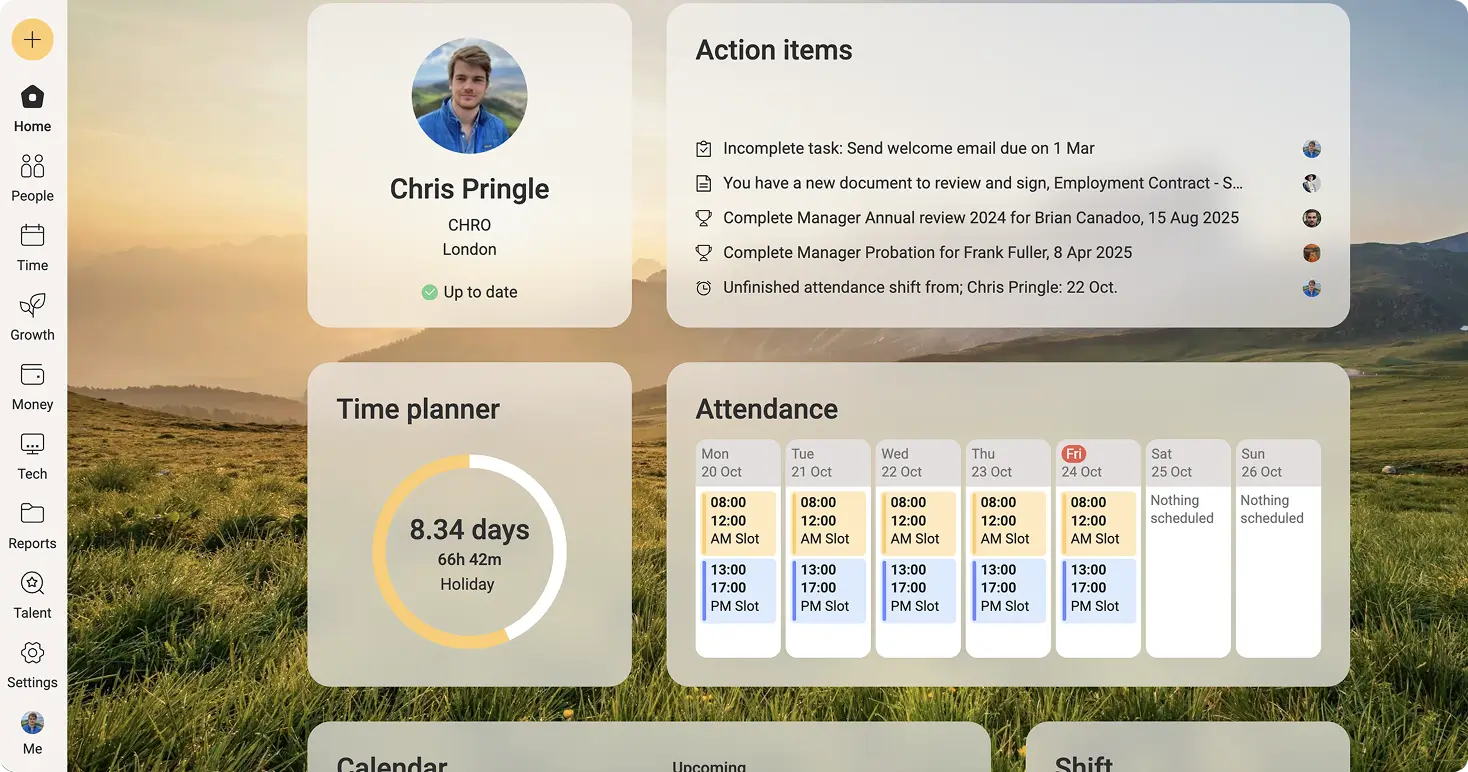
Zelt is a UK-built HR platform that combines HR, payroll, IT and performance in one system. For schools and trusts, that means staff records, absence, payroll and even staff laptops can be managed from one place.
Who It’s Best For
Zelt suits schools and small to mid-sized trusts that want a modern, easy system for HR and payroll. It is a strong fit if you want to stop sending monthly spreadsheets to an outside payroll provider.
Key Features
- Staff records, contracts and documents in one place
- UK payroll linked directly to HR data, with pension contributions calculated in each pay run
- Absence and leave tracking linked to pay, including statutory sick and maternity pay
- Onboarding flows with DBS checks, right to work checks and reference collection
- Expiry reminders for DBS certificates, qualifications and training
- Reports across multiple schools in a trust
- IT device and app access for new starters and leavers
For example, when a teaching assistant joins mid-term, the trust can set up their contract, payroll and school laptop in one flow.
Pros and Cons
| Pros | Cons |
|---|---|
| HR, payroll and IT in one modern platform | Newer to education than long-standing school suppliers |
| Easy for school staff to use | Not a managed payroll bureau service |
| Modular pricing, so you pay for what you use | Very large universities may need enterprise tools |
UK Pricing
Zelt charges per employee each month. Core starts at £5 per employee per month, and Pro modules, such as payroll, cost an extra £3.20 per employee per month each.
Integrations
Zelt connects with Google Workspace, Microsoft 365, Slack, Xero and QuickBooks, plus 100+ HR and finance apps through Merge.dev and its public API.
See how Zelt helps schools and trusts manage HR, payroll and DBS checks in one place.
Access Education People: Best for Growing Multi-Academy Trusts
The Access Group is one of the UK’s biggest software suppliers. Its education people products cover HR and payroll for schools and trusts, alongside finance and other education tools
Who It’s Best For
Access suits growing multi-academy trusts that want HR, payroll and finance from one large supplier.
Key Features
- Education HR and payroll
- Teachers’ Pension and LGPS support
- Recruitment and onboarding tools
- Trust-wide reporting
- Links to Access education finance products
Pros and Cons
| Pros | Cons |
|---|---|
| Wide range of education products from one supplier | Many products can make choosing harder |
| Built for trusts with several schools | Setup can take time for large trusts |
| Strong finance links | No public pricing |
UK Pricing
Pricing starts from £9/employee/month. Access prices by custom quote based on staff numbers and modules.
Integrations
Access connects its HR and payroll tools with its own finance and education products, plus selected third-party systems.
IRIS (Every HR and IRIS Payroll): Best for Schools Wanting One Supplier
IRIS offers a wide range of software for schools. Every HR covers school HR and compliance, and IRIS payroll products handle pay.
Who It’s Best For
IRIS suits schools and trusts that want HR, compliance, payroll and other school software from one supplier.
Key Features
- School HR records and absence tracking
- Single central record and compliance tools
- UK payroll with education pay elements
- Pension support for Teachers’ Pension and LGPS
- Links to other IRIS school products
Pros and Cons
| Pros | Cons |
|---|---|
| One supplier for many school systems | Several products can be confusing to compare |
| Strong compliance focus | HR and payroll may be separate products |
| Long UK payroll experience | No public pricing for most products |
UK Pricing
Pricing starts from ~£43/month. IRIS prices by quote depending on products and school size.
Integrations
IRIS connects its HR and payroll tools with other IRIS education and finance products.
Juniper Education: Best for Schools Wanting HR and Payroll Support
Juniper Education provides software and services for schools. Its HR and payroll offer combines tools with expert support for schools that want extra help
Who It’s Best For
Juniper suits maintained schools and academies that want HR and payroll support from education specialists, not just software.
Key Features
- Payroll services for schools
- HR advice and support
- Teacher pay and pension handling
- Absence and staff records
- Links to other Juniper school products
Pros and Cons
| Pros | Cons |
|---|---|
| Education-focused support team | Less control than running payroll yourself |
| Software and services together | No public pricing |
| Good for schools without HR staff | Features depend on the package chosen |
UK Pricing
Juniper prices by custom quote.
Integrations
Juniper links with its own school products and selected finance systems.
Strictly Education: Best for Managed School Payroll
Strictly Education provides support services to schools, including payroll, HR advice and finance support. Its payroll team runs pay for schools so staff can focus on running the school.
Who It’s Best For
Strictly Education suits schools and trusts that do not have payroll staff and want education specialists to run payroll for them.
Key Features
- Managed payroll for teachers and support staff
- Teachers’ Pension and LGPS returns handled for you
- HR advice for schools
- Online payslips and staff self-service
- Finance and other school support services
Pros and Cons
| Pros | Cons |
|---|---|
| Payroll run by education experts | Less control than running payroll in-house |
| Saves time for small schools | Changes must go through the provider |
| HR advice available | No public pricing |
UK Pricing
Strictly Education prices by custom quote.
Integrations
Integrations depend on the payroll system used behind the service. Ask how data links to your MIS and finance system.
MHR iTrent: Best for Large Colleges and Universities
iTrent is an HR and payroll system from MHR, a UK company based in Nottingham. It is widely used across the UK public sector, including further and higher education.
Who It’s Best For
iTrent suits large colleges, universities and big trusts with complex pay structures and large HR teams.
Key Features
- UK payroll for complex pay rules
- Pension scheme support
- HR records and self-service
- Absence, learning and performance tools
- Workforce reporting
Pros and Cons
| Pros | Cons |
|---|---|
| Strong public sector experience | Too complex for small schools |
| HR and payroll in one system | Interface may feel less modern than newer tools |
| Handles large, complex workforces | Setup can take several months |
UK Pricing
Pricing starts from £7/employee/month. MHR prices iTrent by custom quote.
Integrations
iTrent connects with finance, recruitment and learning systems through standard links and APIs.
Workday: Best for Large Universities
Workday is a global enterprise HR and finance platform. Several large universities use it to manage HR, payroll, recruitment and finance in one system.
Who It’s Best For
Workday suits large universities with thousands of staff, complex structures and dedicated HR systems teams.
Key Features
- Enterprise HR and talent management
- UK payroll through Workday Payroll
- Recruitment and onboarding
- Workforce planning and analytics
- Financial management on the same platform
Pros and Cons
| Pros | Cons |
|---|---|
| Very powerful and scalable | Expensive for schools and smaller colleges |
| HR and finance in one platform | Long setup, often with a consultancy partner |
| Strong reporting | Not built around school-specific rules |
UK Pricing
Workday prices by custom quote, usually on multi-year contracts.
Integrations
Workday offers its own integration tools and connects with many student, finance and recruitment systems.
UK Education Payroll and HR Needs Your Software Should Handle
The education sector has different rules than other businesses and a general HR solution may not cover them all. Below are some areas to test closely in any demo. This section focuses mainly on England, as Wales, Scotland and Northern Ireland have some different arrangements.
Teacher Pay Scales and Pay Awards
In maintained schools, pay for teachers in England is set by the School Teachers’ Pay and Conditions Document (STPCD). Academies can set their own pay, but many choose to follow it. Pay awards usually apply from 1 September, but they are sometimes confirmed later. When that happens, payroll must calculate back pay for every affected teacher. Good software can apply a new pay scale and work out arrears in bulk, instead of one person at a time. Also check whether it handles allowances or not, such as teaching and learning responsibility (TLR) payments and SEN allowances.
Teachers’ Pension and LGPS
Most schools run two pension schemes. Teachers usually join the Teachers’ Pension Scheme, while support staff usually join the Local Government Pension Scheme (LGPS).
Both schemes have tiered employee contribution rates based on pay. Employer rates are also high. For example, the Teachers’ Pension employer rate rose to 28.68% from April 2024.
Your software must calculate both schemes correctly and produce the returns each scheme needs, such as Teachers’ Pensions monthly data returns. Mistakes here can mean costly corrections later.
Term-Time and Support Staff Pay
Many support staff only work during term time but are paid in equal monthly amounts across the year. Their pay often includes holiday pay worked out using a set formula.
Holiday pay for term-time staff has been a tricky area. The Supreme Court’s Harpur Trust v Brazel ruling in 2022 affected how holiday is calculated for part-year workers. Check that your software can handle the method your school or local authority uses.
Safer Recruitment, DBS Checks and the Single Central Record
Schools in England must follow Keeping Children Safe in Education. This statutory guidance requires schools to keep a single central record of pre-appointment checks on staff.
These checks include identity, right to work, enhanced DBS checks and barred list checks where needed. Software that tracks each check and flags gaps can make Ofsted inspections much less stressful.
For example, a dashboard might show that a new cover supervisor’s DBS certificate has been seen but their second reference is still missing.
School Workforce Census Returns
The Department for Education collects staff data each year through the School Workforce Census, usually in the autumn term. Maintained schools, academies and local authorities must take part.
The census covers contracts, pay, absence and qualifications. If your HR and payroll data is clean and in one place, producing the return is much quicker. Ask suppliers whether their system can produce census data directly or work with your MIS to do so.
How to Choose the Right Education HR and Payroll Software
The right system depends on your size, your team and how much of payroll you want to run yourself. These steps will help you choose with confidence.
Start With Your Biggest Risk or Pain Point
Write down the one problem that worries you most. It might be pension errors, back pay after pay awards, gaps in the single central record or hours lost to spreadsheets.
Then judge every supplier on how well they fix that problem first. A long feature list means little if it does not solve your biggest headache.
Check How It Links to Your Finance System and MIS
Your HR and payroll system needs to share data with your finance system and your MIS. Without these links, staff details get typed in two or three times.
Ask each supplier which finance systems and MIS they connect to, how often data syncs and who fixes problems. If you are in a trust, check this works across every school.
See Compliance Features in a Live Demo
Do not rely on a feature list for compliance. Ask the supplier to show you, live, how they handle a pay award with back pay, a Teachers’ Pensions return and a single central record check.
If they cannot show it clearly, treat that as a warning sign. These are the tasks most likely to cause problems later.
Test Reporting Across Schools or Departments
Trusts and colleges need to see data across the whole organisation. Check you can compare staffing costs, absence and vacancies by school or department.
For example, a trust CFO might want to see supply cover costs for every school on one screen, without asking each school business manager for a spreadsheet.
Compare Setup, Data Move and Ongoing Costs
Add up the total cost over three to five years. Include setup, data migration, training, support and any charges for extra pay runs or pension returns.
Also plan your timing. Many schools prefer to switch payroll at the start of a new tax year on 6 April, or over a quieter period, to reduce risk. Ask each supplier how long setup usually takes for a school or trust your size.
Why Schools and Trusts Choose Zelt
Zelt brings staff records, safer recruitment, absence, payroll and IT together in one modern platform, so schools and trusts can spend less time on admin and more time on education.
- Safer recruitment built in. DBS checks, right to work checks and references are tracked as part of onboarding, with expiry reminders for renewals.
- One view across your trust. You can manage and report on every school from one place, with permissions set by school.
- Absence linked to pay. Sickness and leave flow straight into UK payroll, with statutory pay calculated automatically.
- Staff ready from day one. Laptops, apps and accounts are set up during onboarding and removed when staff leave.
- Secure and easy to use. Data is hosted in the UK under ISO 27001 certification, with a simple interface for busy school staff.
For schools and small to mid-sized trusts that want modern HR and payroll without the complexity of legacy systems, Zelt HR software for education sector is the smart choice.